That was a great day. After very few hiring activities this morning, I had the full day working on the book – for the first day after quite some time. It took a while to get into the flow again (it helped to just read for half an hour what I’ve worked on before), but once I was back, I was on a fairly good roll.
And I finished the third big uber section of the book, on “beautiful colors”! 🎉
I even went through that tricky primer on beauty and got that written – and heck yeah, I’m ok-ish happy with it, and that’s all an author can ask for.
Oh, and I posted a little color trick on Twitter.:
When you feel like your colors don’t harmonize with your background colors, try to
- overlay your colors with the background color
- choose blend mode “hue”
- play around with the opacity until you’re happy
Here’s how to do that in Figma:
Here’s how to do that in Adobe Illustrator:
You don’t have a Figma or Adobe license? Here’s how to do that in the free tool photopea.com. Just drag a screenshot in there to get started. You can then pick the hex code of your new colors with the Eyedropper (shortcut: press “i”).
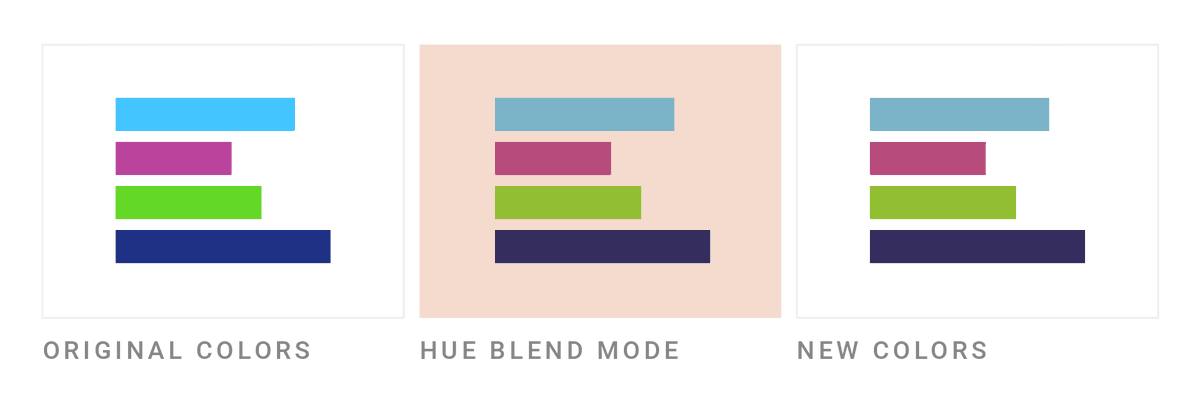
This also works well if you a) want your colors to appear more similar, even without a colorful background. Play around with the colors that you overlay and see what happens. b) worked with Night Shift/Flux when choosing colors, and now you want to bring them back.
What’s left in the book is a not-yet-well-fleshed-out section that I just called “Get to the next level” for now. I’ll start sorting that out tomorrow.